Book a demo

Migration

Migrate NSX and firewall policy to Isovalent and OpenShift.

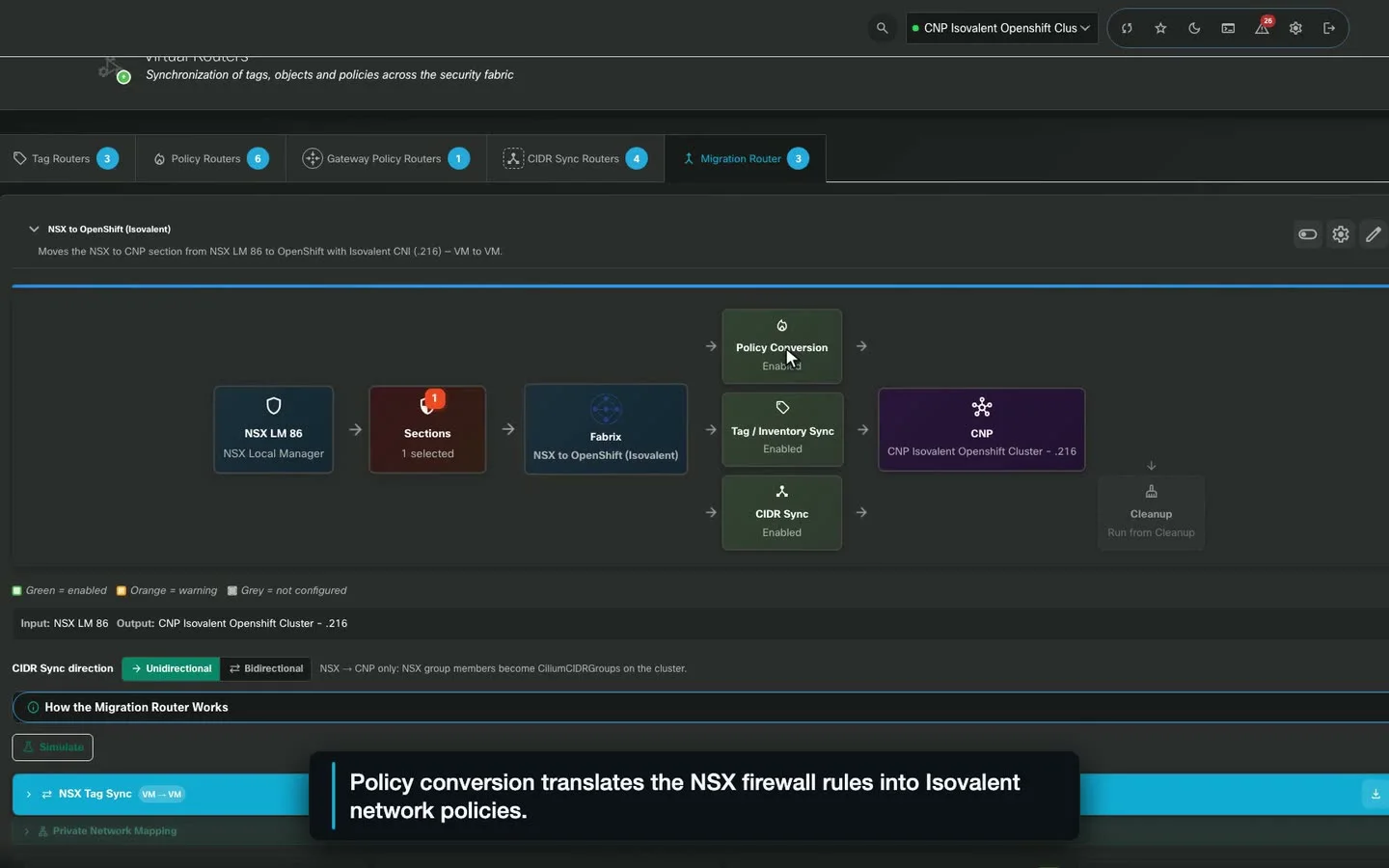
One router replaces three sync jobs. It reads NSX DFW and third-party firewall policy (Palo Alto, Check Point, Fortinet, Cisco ASA/FTD) into Fabrix, converts it to label-native Cilium network policy, and publishes it, with simulation before every run.

Fabrix Migration Router from NSX Local Manager to an OpenShift cluster with Isovalent: sections, policy conversion, tag and CIDR sync stages
FromVMware NSX DFWand third-party firewall policy
FabrixInventory · Simulate · Convert · Publish
ToIsovalent on OpenShiftIsovalent Enterprise · Cilium OSS

How a migration runs

Six steps, from baseline to sign-off.

  1. As-Is Report

    Document the source estate before anything changes: sections, rules, groups, members and objects, exported as the migration baseline.

  2. Endpoint & Label Sync

    VMs not yet migrated become label-selectable endpoints on Isovalent and OpenShift; NSX tags are stamped as labels on migrated pods and VMs.

  3. CIDR Sync

    Raw-IP and IP-set groups become CiliumCIDRGroups. Bidirectional mode writes child groups back to NSX during coexistence.

  4. Policy & Cleanup

    Rules convert to CNPs with ports and direction preserved. Cleanup removes temporary CIDR groups and endpoints once peers are label-covered.

  5. Validate with Hubble

    Fabrix's Hubble integration streams live flows onto the topology by verdict, so dropped traffic is caught and fixed in one click.

  6. As-Built Report

    Document the target as published: CNPs, CIDR groups, endpoints and per-rule coverage, ready for sign-off against the as-is baseline.

  • Deny AnalyzerPreserves NSX first-match order under Cilium's absolute denies: redundant denies are skipped, true carve-outs pushed, order conflicts flagged for review.
  • Simulate firstEvery rule is classified Safe, Warn or Block by the same engine the live run uses. Risky rules are skipped on publish.
  • Safe to runTouches only Fabrix-managed objects, continues past per-rule failures, audits every write, and splits logs and diagnostics per sync type.

Hubble flow validationConfirm target cluster health

Everything Fabrix does

Choose a role in "Your role" (top right) and this page reshapes around what you care about.

Migration tools in the console

For you
Universal
Inventory ReportsThe As-Is baseline for every source.
As-Is baselineNSX · FMC/FTD · ASA · ISE · vCenter · Check PointExport to Excel
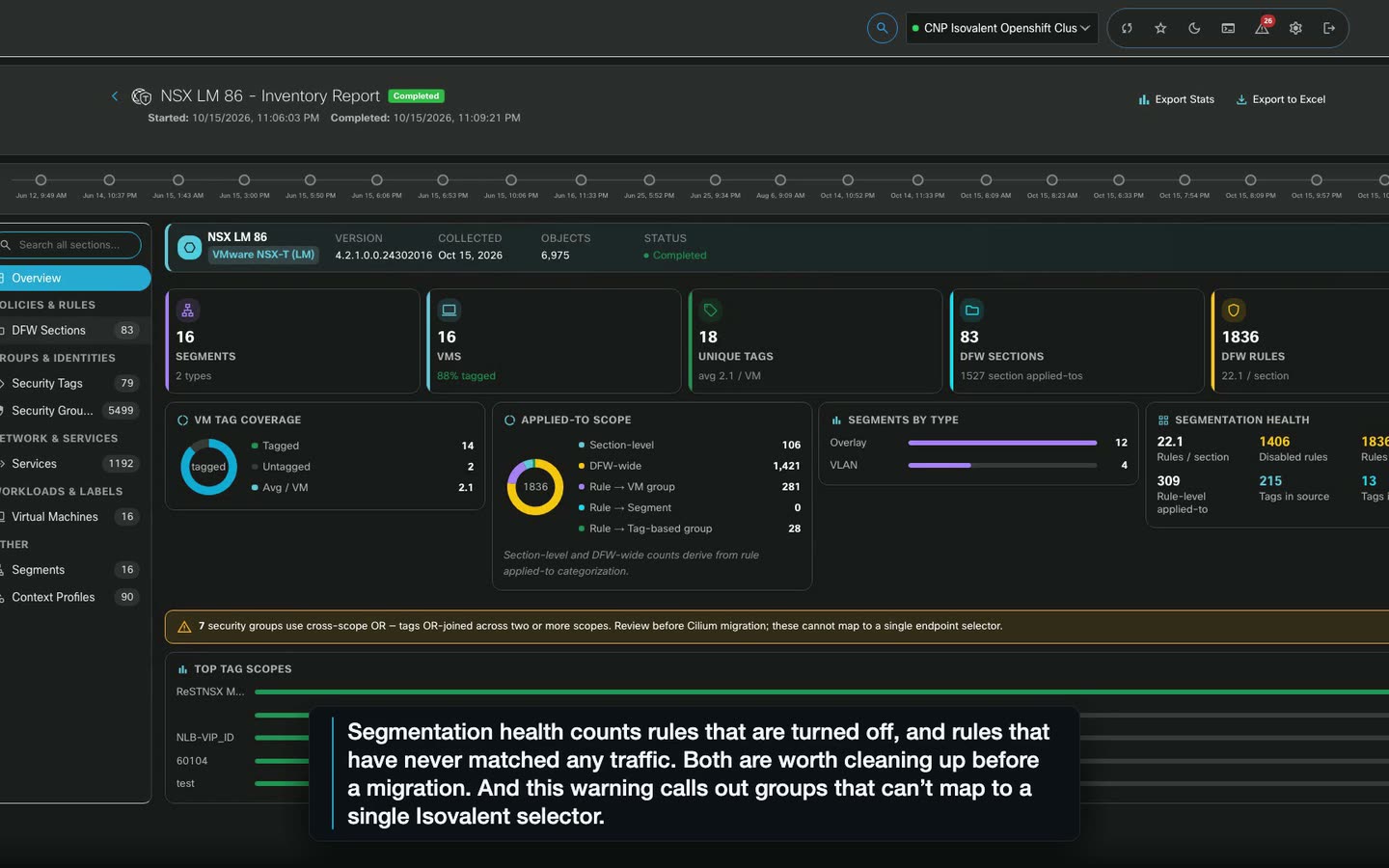
Screen recording of a Fabrix Inventory Report for an NSX Local Manager: DFW sections, rules, groups, tag coverage and segmentation health
For you
Tools
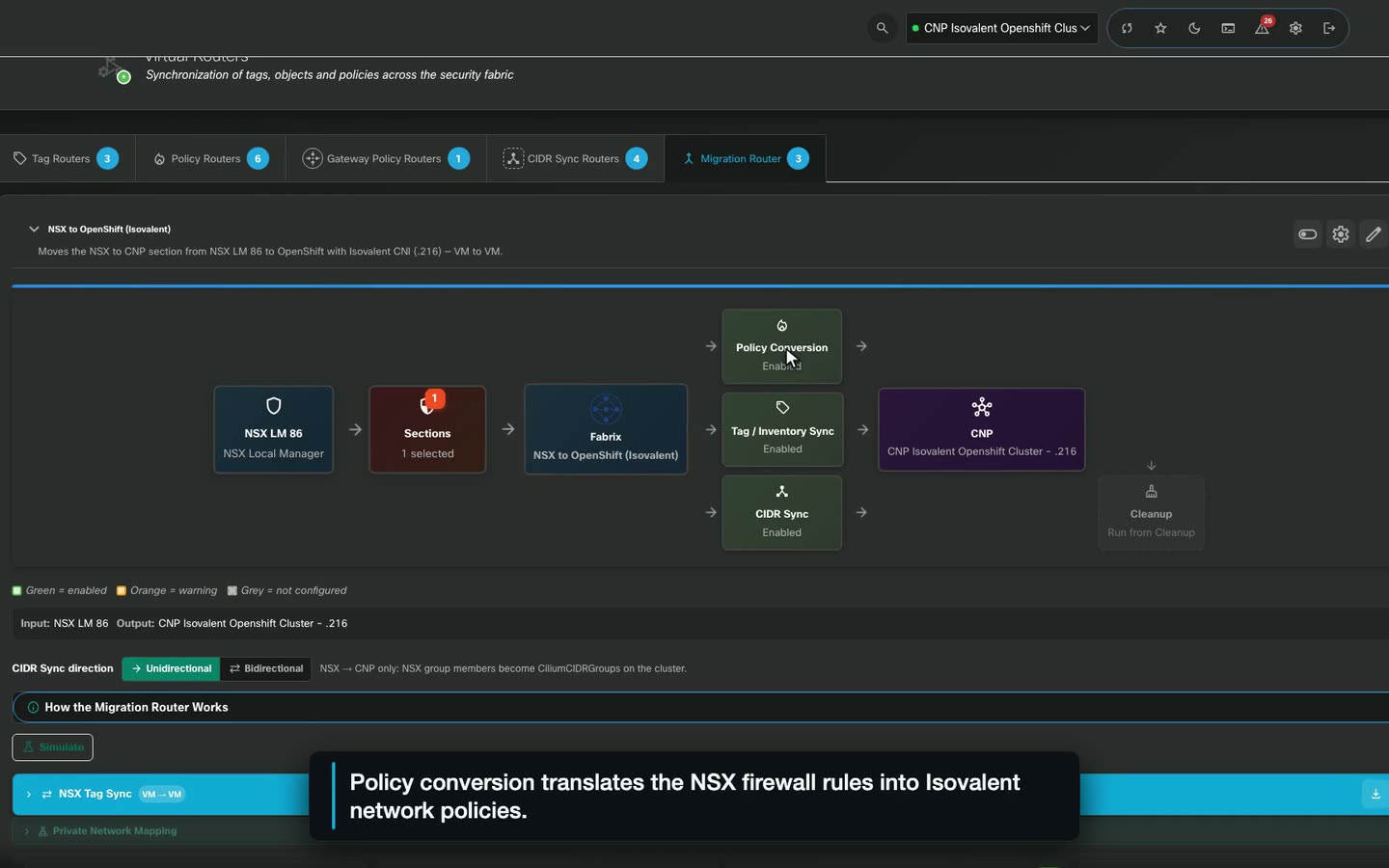
vRouterNSX to Cilium in one pipeline, simulated first.
Migration Router: Simulate → PublishTag RoutersWhat-If Scenario RunnerMigration Wave Planning · Rollback Sync
Screen recording of a Fabrix Migration Router from NSX to OpenShift with Isovalent: policy conversion, tag sync and CIDR sync stages
For you
Tools
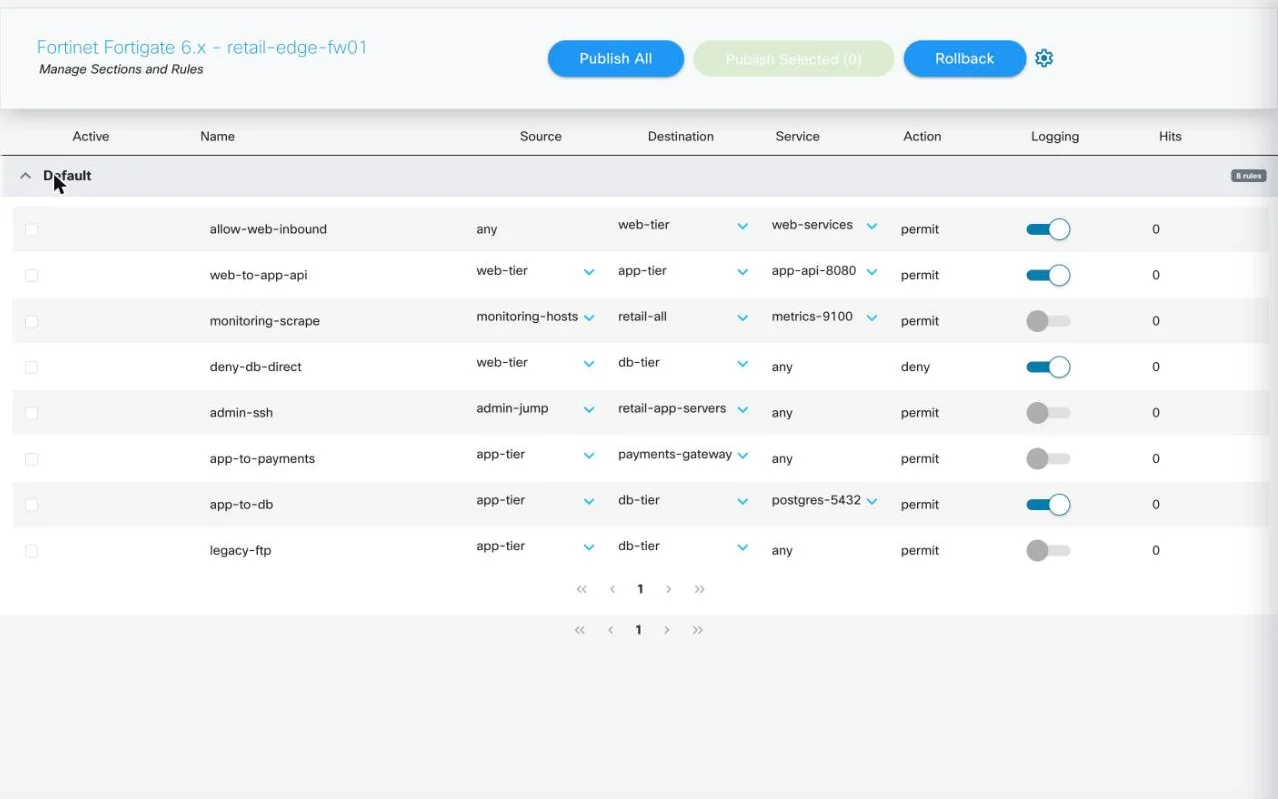
TransformerConvert firewall configs to Cilium policy.
Palo Alto · Check Point · Fortinet · ASA/FTDPublish as CNPRollback
Fabrix Transformer with an imported FortiGate configuration: eight policies with source and destination address objects, services, permit or deny action and logging, ready to publish as Cilium policy
For you
Tools
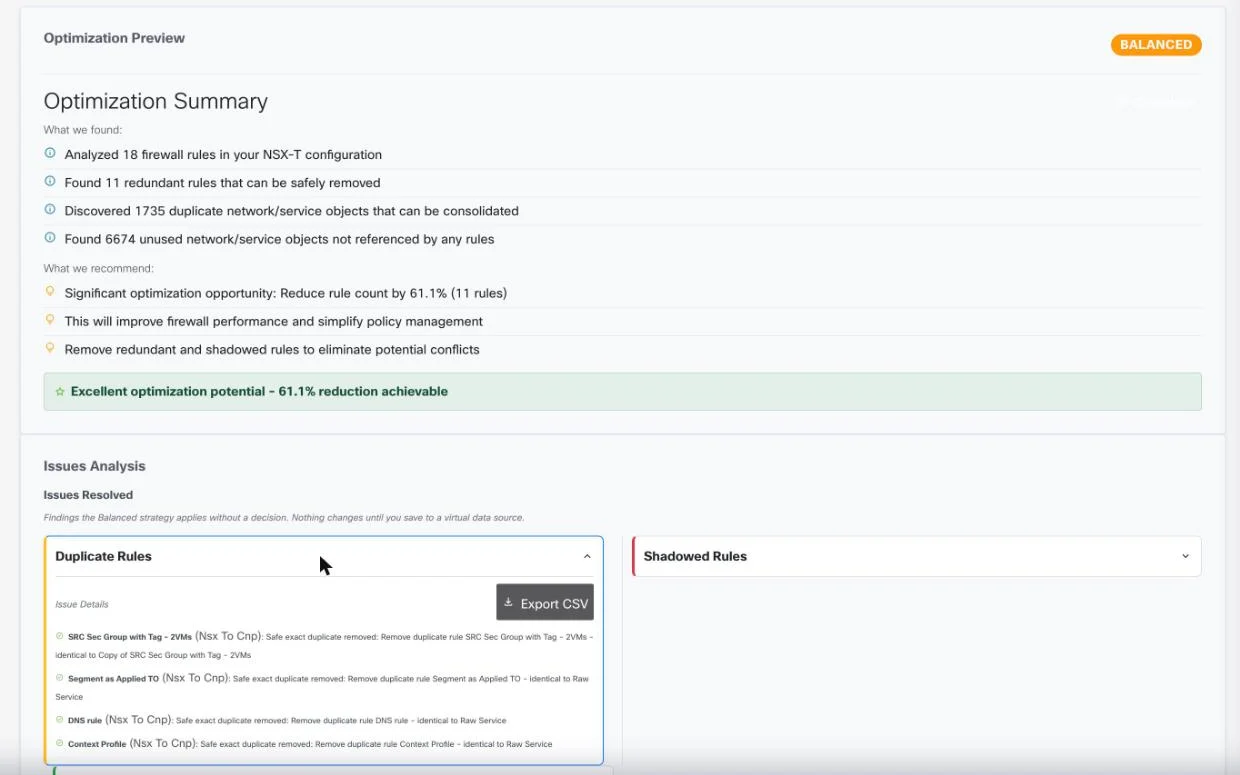
RefineryClean the rule base before you move it.
Conservative / Balanced / AggressiveUnused Objects Analysis
Fabrix Refinery preview of an 18-rule NSX section: 11 redundant rules, duplicate and unused objects, a 61.1% possible reduction, and each duplicate rule named with the rule it matches

Also for migration teams

Around the move.

  • Policy-Gap RemediationA dropped flow prefills an allow; an unexpected allowed flow prefills a deny.
  • KubeVirt VM SupportVMs moved to OpenShift Virtualization are managed like pods, in inventory and topology.
  • Applied Policy InspectorSee the eBPF policy actually enforced on any endpoint after publish.
  • Prism ApplianceRehearse a migration at target scale on a single node before touching production.
  • Workload ConsoleExec into pods or open a VM serial console from the browser, RBAC-gated and audited.
  • Cluster MeshSee cross-cluster links where policy references workloads in more than one cluster.